Showing posts with label Big Shot Magnetic Platform. Show all posts

Wednesday, 8 January 2014

Different Ways with Diecuts - Part 1


Do you have a Big Shot die cutting machine?  Wondering what to do with it?

I thought it might be fun to do a few posts on different ways to use some of my favourite dies.

1.  Shaped cards:


Want to know how I made it?  Easy!  I made a Pacific Point version and a Tangerine Tango version.

Supplies:  
Stamps:  Woodgrain background; Wildflower Meadow Background stamp; Sweet Essentials
Ink:  (blue cards) Pacific Point Classic Ink, Soft Sky classic ink, soft sky, Old Olive, Marina Mist, Pacific Point markers, Jet Black Stayzon ink.  (orange cards) Tangerine Tango Classic ink, cameo coral, pumpkin pie, tangerine tango, crushed curry markers, Jet Black Stayzon.
Other:  Big Shot, Labels Collection Framelits, basic rhinestones, sponges.

Method:
1. Take half an A4 sheet of Whisper White cardstock, fold it in half to form the card base.

2.  Line up Largest Labels Framelit as shown so that the folded edge is inside the frame and cut out with your Big Shot and the magnetic plate.  TIP:  the magnetic platform means the framelit won't shift around; if you don't have one, use post it notes or washi tape to keep your framelit where you want it.


3.  Using the same framelit, cut out a piece of Pacific Point/Tangerine Tango card.

4.  Stamp your blue or orange piece with a background stamp (I used Woodgrain here). Use the same colour ink as the cardstock for a tone on tone effect.
TIP:  when using a large background stamp, bring the ink to the stamp (see picture) and place your cardstock on top.  Press evenly with your fingers or a bone folder.  Place some scratch paper on top if you don't want to get ink on your fingers (clearly I don't care about a little mess!).


Then sponge the edges with the same ink.

5.  Next, I cut a label from Whisper White cardstock - I used one two sizes smaller than the big one I used for the card base.  


Once this is cut out, sponge the edges as before.

6.  Next stamp your main image.  I used a background stamp called Wildflower Meadows, and I inked it up using Stampin' Markers.  When stamping with markers, always use the brush end and remember to "huff" on the stamp when you have finished colouring it, because otherwise the ink will dry out before you stamp.  Also, I try to use the lightest colours first, then shade with darker colours over the top.  Markers are the best way to make a stamped image multicoloured.  And they are inexpensive too!

7.  Now you can assemble your card - adhere your layers.


Last of all, I used a scrap of whisper white (left over from cutting out the white label shape), and cut it into a 2.5cm strip.  I stamped the strip with the woodgrain stamp in the lightest ink (soft sky on the blue card, cameo coral on the orange one).  I stamped a sentiment in black Stayzon ink (my personal favourite black ink) and notched the ends before sponging the edges to make sure it coordinated with the rest of the card.  Then I adhered the sentiment, using dimensionals, and placed a few adhesive rhinestones to finish it off.

I actually made four blue and four orange cards - it was pretty easy to mass produce by cutting everything out at once. Now my card stash is starting to fill up nicely!

Let me know if you'd like to order any of these products from me, or if you have questions, leave a comment.  


Friday, 20 December 2013

Christmas Wreath


Well, I am putting it out there.  I am a failure as a professional cardmaker.  I am facing the reality that with five days left to go, I am most likely not sending cards out this year for Christmas.

The stockpile I did have, went to the store that sells my cards and other cool stuff, The Mistress of Spice.  Or else were bundled into packs and given away as Christmas gifts to teachers, etc.  As for the MDS cards I had designed - well, I STILL don't have a card-worthy photo of my 4 Things together.  I haven't even had a Santa Photo taken yet this year - which is something I would normally have done weeks ago.  Sigh.

At least I have spent my time productively this week - I've done my Christmas shopping and wrapped all the gifts.  And I spent a good day or two making a new wreath for my front door.


I must say I'm fairly pleased with it.  It wasn't difficult, and I certainly could have done it quicker if I'd made up my mind how it would look before I started instead of designing as I went.  Sigh.

Want to know how I made it?

1.  I took  a styrofoam wreath from a craft store,  and wrapped it in recycled brown paper (Stampin' Up!  packs their boxes with recycled paper, so I'm recycling recycled paper!  Or is that up cycling?) which I tore into strips and glued with a simple glue stick (I used the Stampin' Up! Gluestick).

2.  Then after dithering for ages, I decided on a Real Red and Gold colour scheme and set to work stamping the large snowflakes in Real Red ink on Crumb Cake card stock, middle sized snowflakes on Real Red Cardstock in Gold Ink which I heat embossed with Gold Stampin' Embossing Powder, and the small ones I stamped on Brushed Gold card stock in Real Red ink.

3.  I die cut my snowflakes with their matching Framelit dies and the Big Shot.

4.  I decided we needed more gold, so I die cut the bow and the other snowflakes (retired die from last year's Holiday Mini, sadly) for good measure.

5.  I decided on a banner for the inside of the wreath and die cut the little pennants with the Big shot, then stamped them and heat embossed them with white embossing powder.  

6.  Assembly.  First, I stapled white cotton ribbon to act as a loop to hang the wreath with my staple gun.  Then I attached my banner to some twine with my glue gun.  Then I took it apart and did it again, because I glued the letters backwards the first time.  That's why the "e" in "Merry" is a little wonky.  Uh, I mean charming and homespun.  I then hot glued the twine to the wreath and started randomly applying the snowflakes until my heat gun stopped working (@#$&*).

7.  I attached the bow using Stampin' Dimensionals because the (@#$%) heat gun stopped working.


Here is everything I used to make this wreath - the only things not Stampin' Up! was the polystyrene wreath base, the staple gun and the @#$%&* glue gun.  

Of course, you could just cut a circle from cardboard if you can't be bothered going to the shops to find a wreath.  I've done that before using the backing cardboard from DSP packs.


Happy crafting!


Tuesday, 10 September 2013

Holiday Mini Launch Recap Part 1


I'm back!  Sunday was a full-on day of card making, chatting, shopping and eating at our Mini Catalogue Launch at the Banyo Bowls Club.  Food FX catered the event, and as always, they did a magnificent job.  My kids love to feast on the leftovers (if there are any) after our events.  If you are looking for a caterer I can heartily recommend them.  Here's their website:  Food FX

These are the cards I designed for our Launch featuring gorgeous new Holiday Mini Catalogue products.  Apologies for my photos, I was taking them at night in bad lighting (really I do know better!).

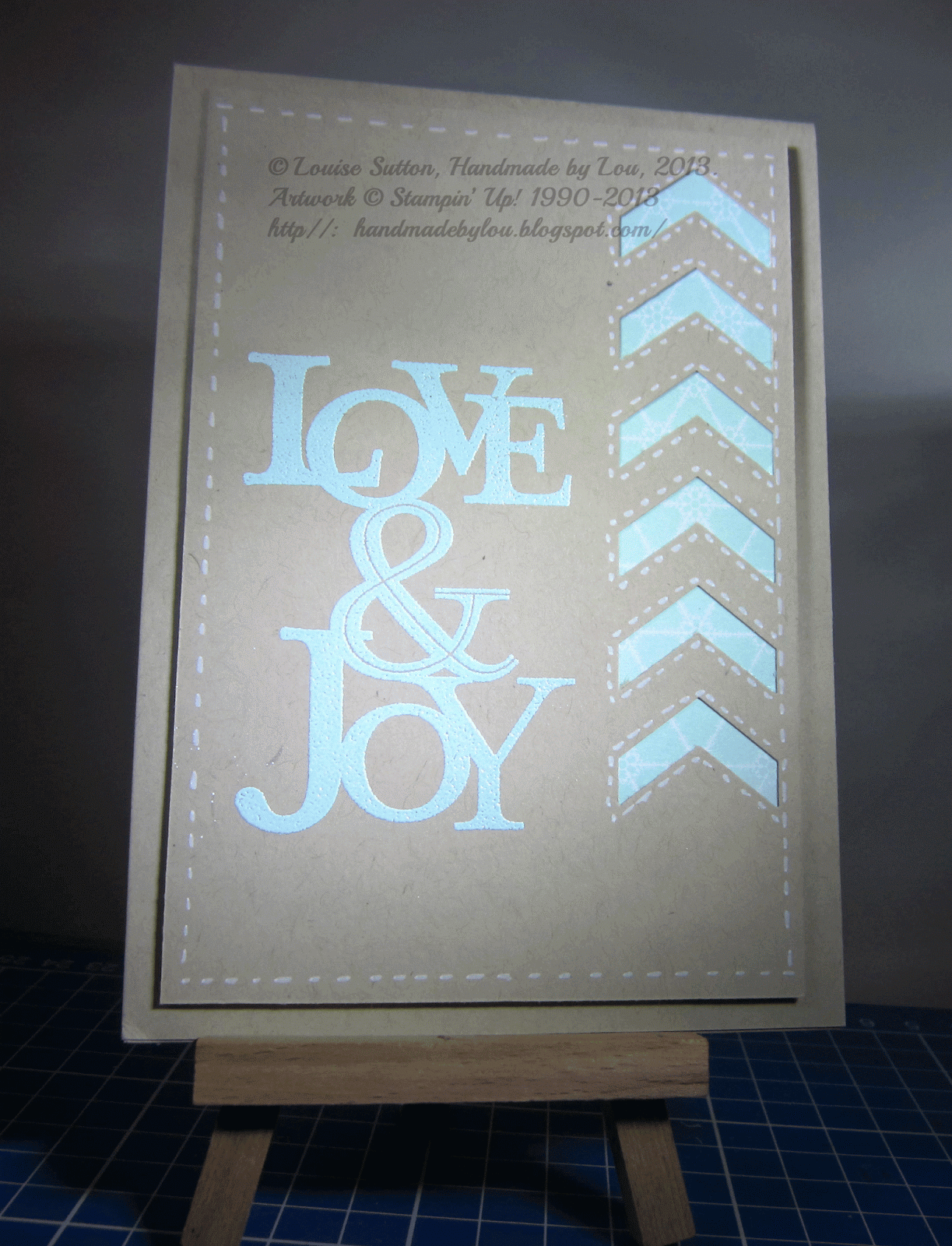
The first card features the new Chevron Border Punch, Winter Frost DSP Paper stack, White Stampin' Chalk Marker (for the faux stitching) and the Love & Joy stamp:

Cardstock:  Crumb Cake; Winter Frost DSP stack (132183, $11.95)
Ink:  Versamark
Stamp:  Love & Joy (wood mount only) (131865, $18.95)
Other: Pool Party embossing powder, heat tool, White Stampin' Chalk Marker (132133, $5.95), Chevron border punch (132154, $37.95), Dimensionals
Nothing too complicated about it, but it is an easy one to mass-produce.  If you are like me, Christmas cards MUST be capable of mass-production, unless you are only planning to send two cards!


The second card showcases the new Seasons of Style Designer Washi Tape, Oh, Goodie! Stamp Set, Silver ribbon (it is so pretty!) and Christmas Messages stamp set.

Stamps:  Oh, Goodie! (wood 131886 $18.95, clear 131889 $14.95) , Christmas Messages (wood 131790 $49.95; clear 131793 $39.95)
Cardstock:  Old Olive A4, Whisper White A4
Ink:  Raspberry Ripple (or alternatively Old Olive)
Other:  Seasons of Style Designer Washi Tape (132155 $8.95)
Ribbon:  Silver 3.2mm ribbon (132137, $8.95)
Deco Labels Collection Framelits (130102 $42.95)
Big Shot Die Cutting Machine (113439 $149.95)
Magnetic Platform (130658 $69.95)
Basic Rhinestones (119246 $8.95)
Glue dots (103683 $8.95)
Lou's Tip:  The Magnetic Platform is fantastic when trying to exactly line up a stamped image or sentiment in a framelit.  I used to do the "Post It Note" trick where a post it note was used to temporarily anchor the framelit in place.  Not any more!  To see a video of the magnetic platform in action, look HERE.

And last of all, Christmas Messages stamp set and Tape It (from the main Catalogue).

Stamp:  Christmas Messages (wood 131790 $49.95; clear 131793 $39.95); Tape It (wood 130712 $46.95, clear 130715 $36.95)
Paper:  Cherry Cobbler A4, Whisper White A4
Ink:  Sahara Sand, Cherry Cobbler; Baked Brown Sugar, Gumball Green
Fibres:  Cherry Cobbler seam binding ribbon (120992, $11.95); Whisper White Baker's Twine (124262 $4.95)
Other:  Chalk Talk Framelits (129983 $42.95)
Big Shot Die Cutting Machine (113439 $149.95) Magnetic Platform (130658 $69.95)
Basic Rhinestones (119246 $8.95) 
Again, a simple card, that works out to be extremely affordable because you are stamping the Washi strips instead of using tape.  Of course, you could reproduce this card with Washi tape if you like, but it will be expensive if you are planning on making 20-75 cards.  This way is cheaper, and you can make the Washi tape any colour you wish.

As always, if you'd like to order these products so you can make these cards yourself, email me, or else head on over to my Online Store to place an order.  Click to go to Handmade By Lou's Store

Next post I'll be showing Rebecca O'Gorman's cards - they are so pretty!


Getting closer....

It's nearly that time of year, where the retirement list comes out.  That means the in-colours we've loved the past 2 years are leav...